AI Voice Check-in Verification for Commercial Facility Teams
One Phone Number. Any CMMS.
Every Vendor. Every Site.
Technicians from every vendor call one number to check in and out of any site. Each call is location-verified and synced to your CMMS, so you see who showed up, for how long, and what got done.
The problem
Every vendor checks in differently. So you can't prove who showed up.
Multi-site operators run on a long roster of vendors, each with its own app, its own phone tree, or no process at all. It falls apart three ways:
Unverified visits
Technicians skip the app or the phone tree, and the check-ins you do get can't confirm anyone was on site.
Days lost chasing
FM managers spend the day chasing vendors for status and notes, so equipment stays down longer.
Invoices without proof
Invoices claim hours on site that no record confirms, so you pay first and dispute later.
Check-in should be your proof the work got done. Right now it's a blind spot.
How it works
One number. Four steps. Proof in your CMMS, every time.
- 01
The technician calls one number.
The same number for every job and every site. spryggAIVR knows the technician from their caller ID and pulls up their open work order. No portal to open, no login.
- 02
Their location gets verified.
A one-tap text confirms the technician is physically at your site before the clock starts. Nothing to download, nothing to log into.
- 03
Vendors check out by talking.
The technician calls back and just says what they did, and spryggAIVR turns it into a clean, ready-to-file completion report.
- 04
It syncs to the system you already use.
Status, verified time on site, and completion notes flow to your CMMS, a shared spreadsheet, an inbox, or a Slack channel.
Inside the platform
Real screens from spryggAIVR: every visit, from the first check-in call to the completion report in your system.
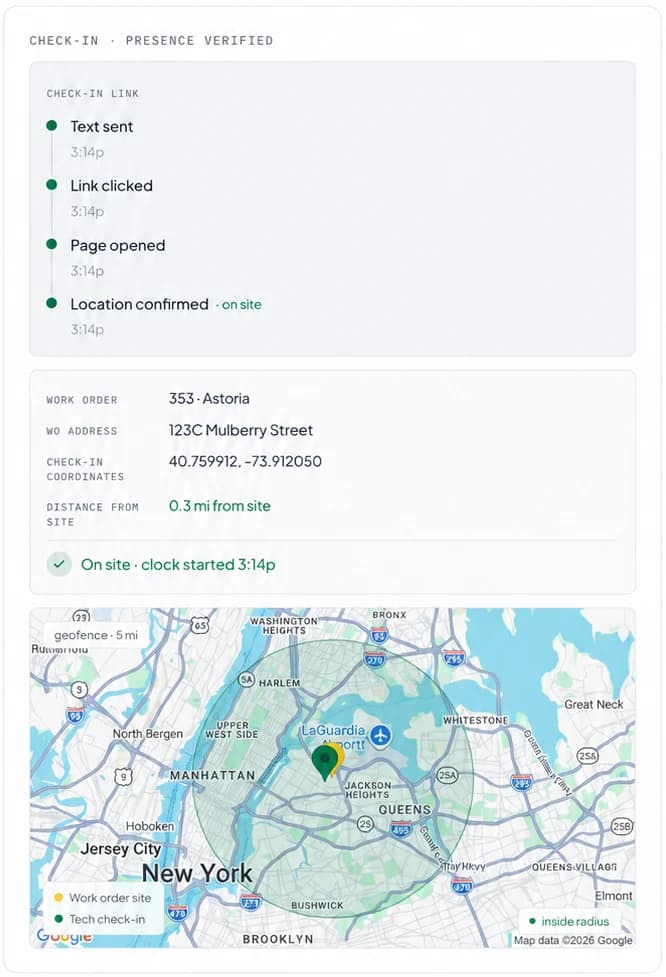
Presence verified before the clock starts
A phone call and a one-tap text put a verified technician on the clock, with no app or login.
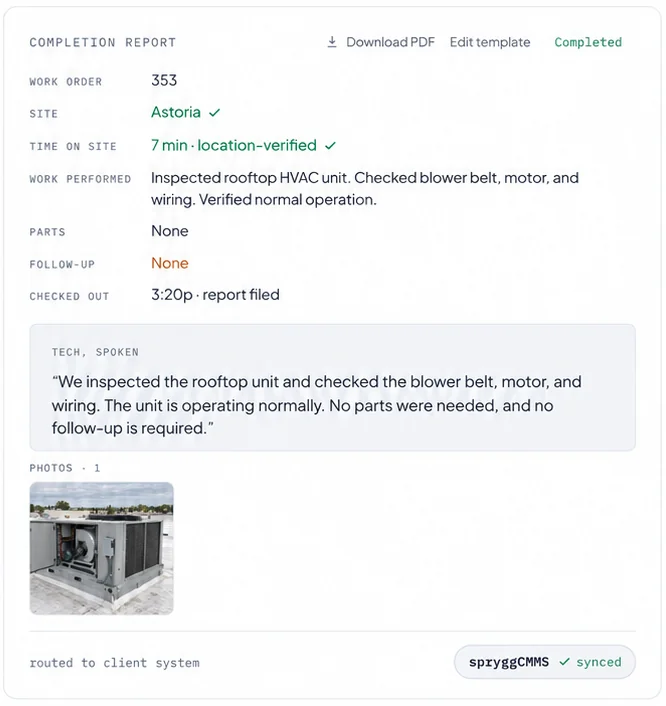
Every check-out writes its own report
The technician describes the work and texts photos; spryggAIVR builds an auditable completion report, routed to your work order tracking system.
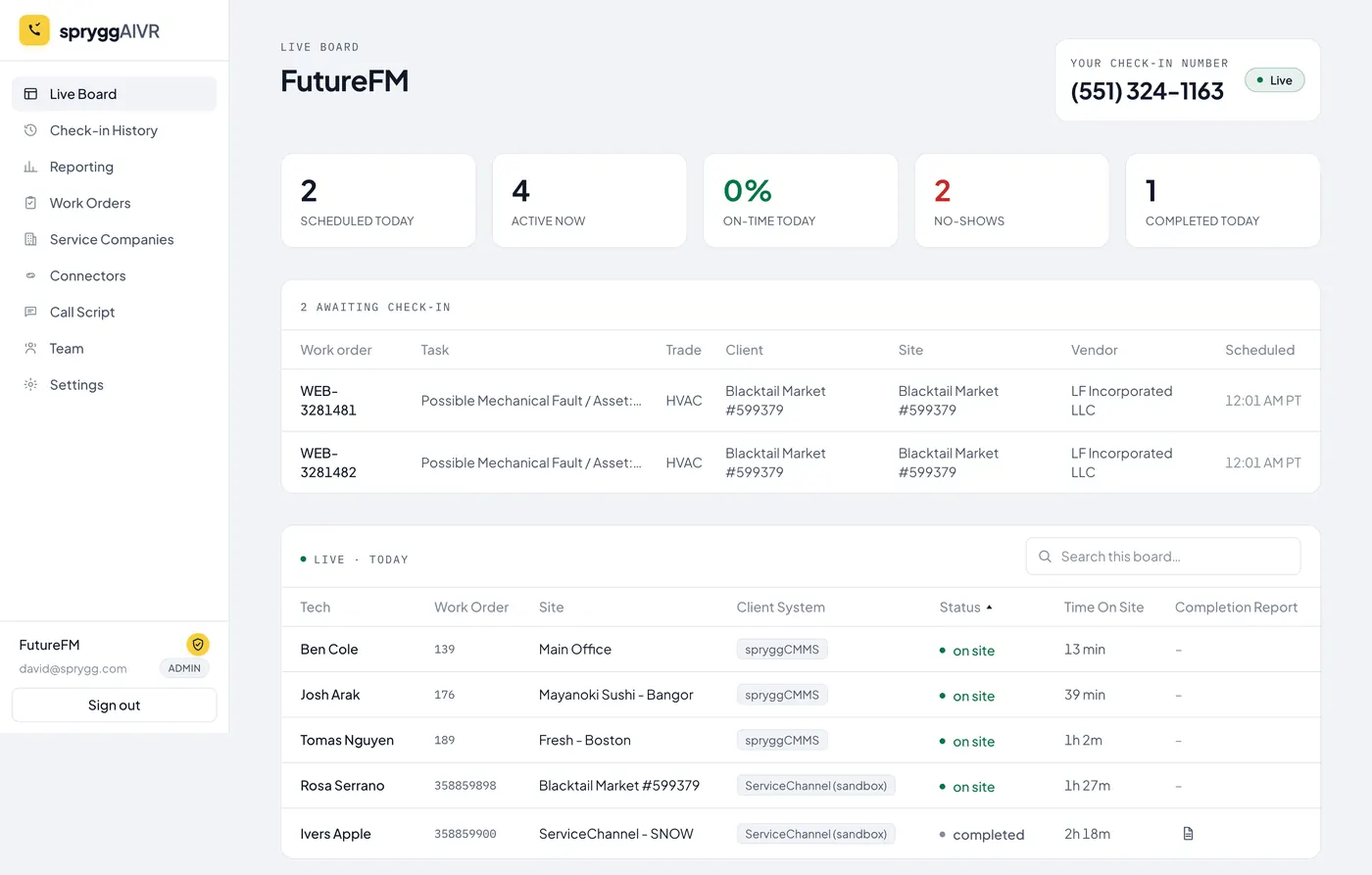
See who’s on site right now
The live board shows every technician on site, how long they’ve been there and today’s check-in totals, without calling a single vendor.
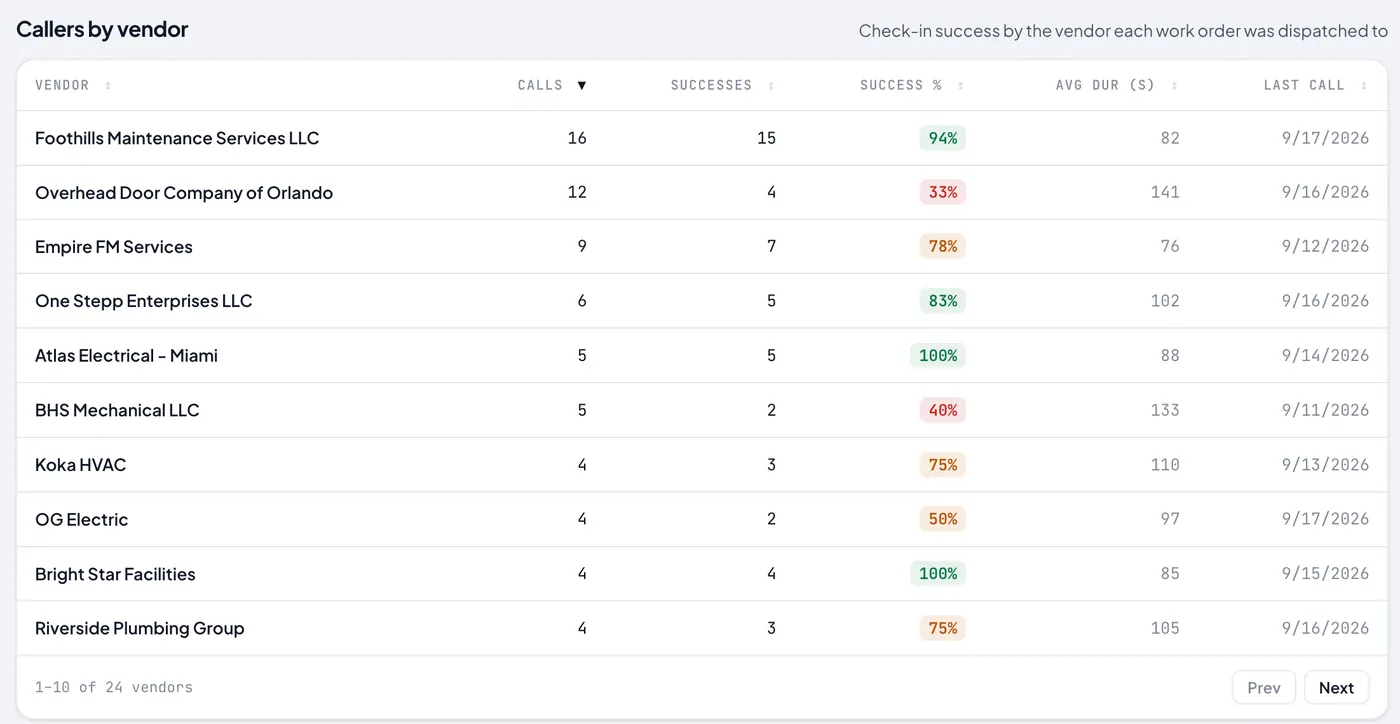
Know which vendors deliver
Every visit adds to each vendor’s history automatically, so you can compare vendors on verified check-ins before you assign the next job.
Check-ins tracked where your team works
Check-ins, verified presence, and completion reports reach every team that needs them, whether they work in a CMMS, a spreadsheet, an inbox, or Slack.
What it does
Built for the way multi-site FM actually runs.
One number, wherever your teams track it.
Connect the CMMS, spreadsheet, inbox, or Slack your teams use. Every site and every vendor follows one check-in process instead of one per system, and the routing happens on its own.
Technicians actually use it.
A phone call reaches every vendor and every technician on day one. No app, no login, no training. Adoption is the whole game, and a phone number wins it.
Verified presence, documented work.
Location-verified check-in, voice-captured completion notes, and photos via SMS give you proof the work was done right: the record behind every invoice you approve.
Monitoring that keeps you ahead of your stores.
See check-ins live, catch late starts and no-shows as they happen, and identify vendors who show up on time and get equipment running quickly.
The views your FM managers work from.
Every call feeds the same operational picture: who's on site right now, which systems are connected, and proof of presence down to the pin.
See which vendors show up on time, and which ones don't.
Why a phone call, not an app
You've tried the app. Your vendors' technicians already juggle a different app for every customer, and they won't add another. A phone number reaches all of them on day one. We didn't fight that reality. We made the phone call do more.
Versus legacy IVR
Your CMMS phone check-in, rebuilt to prove presence.
Interface
Legacy IVR
DTMF phone tree
spryggAIVR
Voice AI conversation
Multi-site
Legacy IVR
One system at a time
spryggAIVR
One number across every site and CMMS
Presence
Legacy IVR
Trusts the caller
spryggAIVR
Location-verified via one-tap text
Completion data
Legacy IVR
A status code
spryggAIVR
A completion report with photos
Technician experience
Legacy IVR
Technicians work around it
spryggAIVR
30 seconds, natural
Pricing
Pricing that scales with your check-ins
No free tier, no per-seat games. Pick the monthly volume that fits your portfolio and move up anytime.
Starter
Up to 100 check-ins / month
≈ $0.99 / check-in
- One check-in number with caller-ID identification
- Location-verified presence
- Voice completion reports with photos
- Live monitoring board and no-show alerts
- 1 connection to your CMMS or spreadsheet
- $1.29 per extra check-in
Growth
Up to 500 check-ins / month
≈ $0.90 / check-in
- One check-in number with caller-ID identification
- Location-verified presence
- Voice completion reports with photos
- Live monitoring board and no-show alerts
- Up to 3 connections to your CMMS, Slack, spreadsheet, or inbox
- $1.09 per extra check-in
Scale
Up to 2,500 check-ins / month
≈ $0.80 / check-in
- One check-in number with caller-ID identification
- Location-verified presence
- Voice completion reports with photos
- Live monitoring board and no-show alerts
- Unlimited connections to your CMMS, Slack, spreadsheet, or inbox
- Multi-language calls (English and Spanish)
- $0.95 per extra check-in
Enterprise
2,500+ check-ins / month
- Everything in Scale
- Custom integrations
- SSO & dedicated support
- Volume pricing & SLA
Every plan starts with a 30-day free trial. No credit card required.
Go over your monthly check-ins? You're billed the per-check-in overage rate, and never more than the next plan up.
Questions
The practical stuff.
Where can check-ins land?
Wherever your team already tracks them. spryggAIVR delivers verified check-ins, completion reports, and photos into CMMS platforms like ServiceChannel, Corrigo, spryggCMMS, and Accruent, and into a shared spreadsheet, an email inbox, or a Slack channel. If your team uses something we don't support yet, tell us when we set up your free trial; new connectors are how we grow.
How does location verification work?
When a technician calls to check in, we text them a one-tap link that opens in their phone's browser. That link captures the device's location and checks it against the work order's site address, with no app to install and no account to log into. If they're on site, the clock starts; if they're not, you find out immediately instead of when the invoice arrives.
Do technicians need to install anything?
No. The entire check-in and check-out is a phone call to one number. The only tap involved is the texted location link, which opens in the browser they already have. Nothing to download, no login, no training.
How does it know which system to update?
spryggAIVR recognizes the technician from their caller ID and pulls up their open work orders. If there's more than one, the technician gives the work order or job code. From there it already knows which site and which CMMS the job belongs to, so status, verified time on site, and the completion report route to the correct system automatically. Your team never has to pick the right portal, because there isn't one to pick.
Does it work for independent contractors, not just large vendors?
Yes, and independent contractors are exactly where it earns its keep. A phone number reaches every technician on day one with nothing to install and no onboarding, which is the one thing app-based check-in never solved. Same one number, same process, whether the vendor is a national provider or a one-truck shop.
How fast can we get set up?
Fast, because there's nothing to roll out to your vendors. The phone number works the moment we connect it to your systems. Setup time is mostly about wiring up those destination connections; we'll scope the specifics with you when we set up your free trial, based on how many sites and platforms you run.